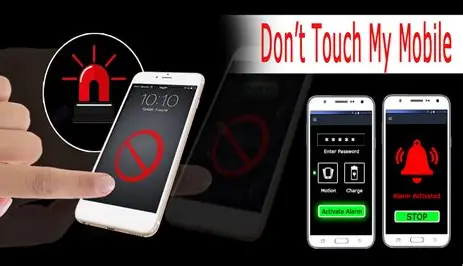
We've all been there. You leave your phone unattended for just a moment—on your desk at work, on a café table, or next to you on the couch—and you get that nagging feeling that someone might have picked it up. Maybe it's a curious friend, a snooping family member, or, in the worst-case scenario, a potential thief. In a world where our smartphones hold our entire digital lives, that uneasy feeling is completely justified. That's exactly where the "Don't Touch My Phone: Alarm" app steps in, offering a simple yet powerful solution that goes far beyond a standard lock screen.
This isn't just another security app; it's like having a personal bodyguard for your device. The concept is brilliantly straightforward: you activate the alarm, place your phone down, and the moment anyone so much as touches it, a loud siren blares out. This immediate auditory deterrent is often enough to startle a snooper or scare off a thief. But this app takes the concept of a basic motion alarm and transforms it into a fully-fledged surveillance tool, giving you not just a warning, but crucial information about the incident.
The Core Functionality: Simple, Yet Genius
Using the app is incredibly intuitive, which is a major plus for users of all tech levels. The process is designed to be quick and hassle-free, so you can set it up in seconds before placing your phone in a potentially vulnerable spot. Here’s how it typically works:
- Place Your Device: Set your phone down on a flat, stable surface. For the best results, you'll want to ensure it's not in a pocket or bag where the motion sensor could be accidentally triggered by your own movement.
- Activate the Alarm: Simply tap the "Activate" button within the app. This instantly arms the system, making your phone a 'hands-off' zone.
- The Trigger: If anyone attempts to lift, move, or even just touch the device, the internal sensors detect this change in position or motion.
- The Response: The app instantly responds by sounding a loud, attention-grabbing alarm. This is where the magic happens. It not only stops the intruder in their tracks but also alerts you and those nearby.
The "Gotcha" Feature: Catching the Culprit Red-Handed
What truly sets "Don't Touch My Phone" apart from a simple motion sensor is its investigative power. The app doesn't just sound an alarm; it collects evidence. This is where the "Who Touched My Phone" feature becomes a game-changer. The moment an unauthorized touch is detected, the app silently activates the front-facing camera to snap a clear photo of the perpetrator.
This feature transforms the app from a reactive security measure into a proactive detective tool. You no longer have to wonder who tried to snoop through your messages or photos; you have a photographic record. The app neatly stores these images for you to review later, allowing you to identify the curious friend, the sneaky colleague, or confirm if it was just a false alarm triggered by a vibrating table.
Features Designed for Modern Security
The app has evolved to include a variety of features that make it more adaptable and user-friendly. Recent updates have focused on giving users more control and improving the overall experience. Key features now include:
- Adjustable Sensitivity: You can now fine-tune how sensitive the motion detector is, which is fantastic for avoiding false triggers from nearby vibrations or minor bumps.
- Enhanced Alarms: Choose from a library of alarm tones to find the one that's most effective (and least annoying for repeated testing).
- Vibration & Flashlight Alerts: Besides the audible siren, the app can now vibrate and flash the camera light, adding layers of visual and tactile warning that can be especially useful in noisy environments or for users with hearing impairments.
- Security Password: To prevent someone from quickly disabling the alarm, a four-digit password is required to deactivate it, ensuring that only you can turn it off.
Why This App Fits Into Daily Life
The applications for this app are extensive and surprisingly practical for many everyday situations. Consider how often you might find yourself in a spot where you'd appreciate this extra layer of security:
- The Office: You can leave your phone on your desk for a moment without worrying about a colleague glancing at private emails or messages during your break.
- Public Spaces: When you’re at a café, restaurant, or a library, placing your phone on the table for a minute is now safe, as the alarm will instantly deter any grab-and-run theft.
- Home with Kids: Curious children often want to play with or explore a parent's phone. This app ensures they can't access inappropriate content or accidentally delete important files without you knowing exactly who did it.
- Roommates or Houseguests: For those who value their privacy, it's a polite but firm deterrent against anyone in your household picking up your device without your express permission.
What About Data and Privacy?
In the age of digital privacy, it's essential to ask: what does the app do with your data? According to its official listing, the developer states that no data is shared with third parties, and no data is collected from your device. This is a significant reassurance. The images of potential intruders are stored locally on your phone, giving you complete control over them.
However, it's always wise to stay informed. The developer's privacy policy highlights that while data isn't collected, it's a good practice to review the policy periodically as it can be updated. The security of your data, including the photos taken by the app, remains firmly in your hands.
The Final Verdict: A Must-Have Peace-of-Mind Tool
"Don't Touch My Phone: Alarm" is more than just a gimmicky alarm app. It's a practical, effective, and surprisingly sophisticated security tool for anyone who values their privacy and smartphone security. Its ability to both deter unwanted access and capture undeniable evidence of it makes it a powerful guardian for your digital world.
With over 444 user ratings and an average score of 4.1 stars, it's clear that many users have found peace of mind through this app. It's free to download, simple to use, and continuously being improved with new features like adjustable sensitivity and expanded alert options. If you've ever felt a twinge of anxiety when leaving your phone unattended, this app is the simple solution you've been looking for. Install it, activate it, and rest easy knowing that if anyone dares to touch your phone, you'll not only catch them in the act—you'll have a photo to prove it.